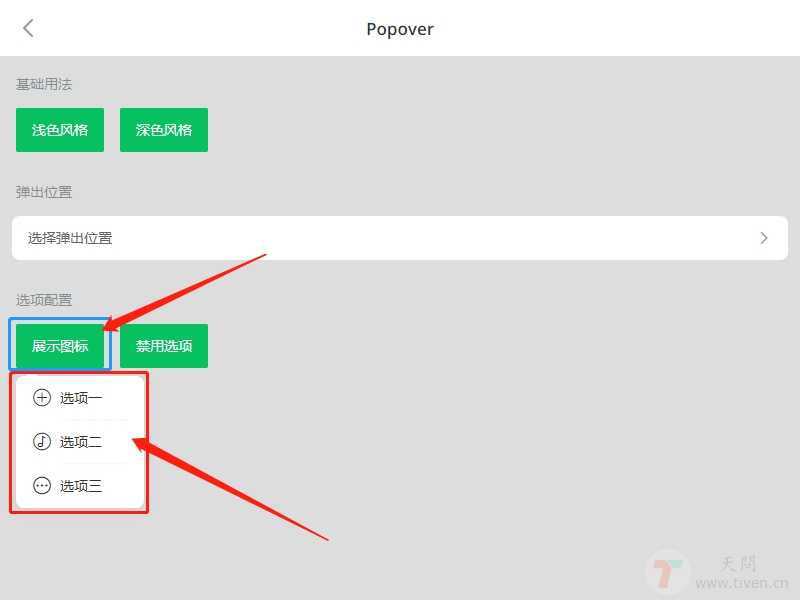
<template>
  <div class="head-nav">
    <van-icon size="24"
              class="nav-icon-left"
              name="arrow-left"
              color="#333" />
    <van-popover :offset="[14,10]"
                 v-model="showPopover"
                 trigger="click"
                 :actions="actions"
                 @select="selectMenu"
                 get-container=".head-nav"
                 placement="bottom-end" >
      <template #reference>
        <van-icon size="24"
                  class="nav-icon-right"
                  name="ellipsis"
                  color="#333" />
      </template>
    </van-popover>
  </div>
</template>

<script>
export default {
  data() {
    return {
      showPopover: false,
      actions: [
        { text: '选项一', icon: 'add-o' },
        { text: '选项二', icon: 'music-o' },
        { text: '选项三', icon: 'more-o' },
      ],
    }
  },
  methods: {
    selectMenu(action, index) {
      console.log(action, index)
    },
  },
}
</script>

<style lang="scss">
  .head-nav {
    width: 100%;
    height: 80px;
    position: fixed;
    left: 0;
    top: 0;
    z-index: 999;
  }

  .nav-icon-left {
    position: absolute;
    left: 30px;
    top: 20px;
  }

  .nav-icon-right {
    position: absolute;
    right: 30px;
    top: 20px;
  }

</style>